QR codes are everywhere — on restaurant tables, product packaging, business cards, event tickets, and store windows. But here's the thing most people don't realize until it's too late: not all QR codes work the same way.
Two people can hold identical-looking QR codes, and one of them can update their destination tomorrow while the other is completely stuck with what they printed. That's the difference between a static and a dynamic QR code — and it matters far more than most people expect.
This guide breaks down exactly how each type works, what you get with each, and how to choose the right one for your specific situation.
What Is a Static QR Code?
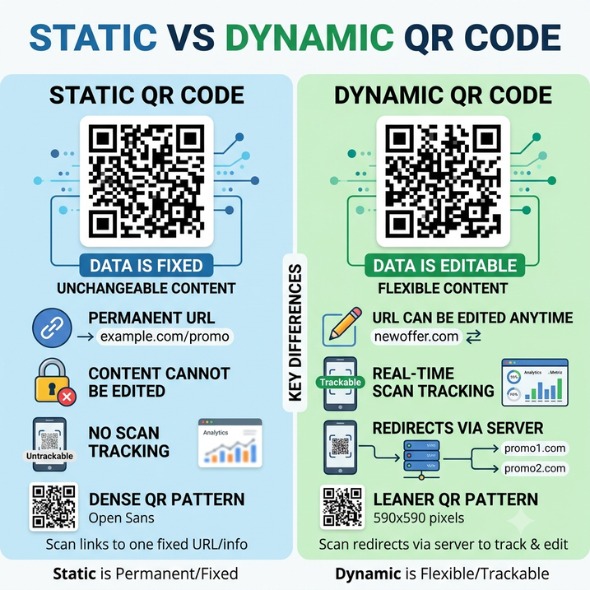
A static QR code permanently stores data inside its pattern. The URL, text, or contact information you encode gets baked directly into the black-and-white dots of the code itself. Once you generate it, the destination is locked — forever.
When someone scans a static code, their phone reads the pattern and goes straight to the destination. No server involved, no redirect, no tracking. It's the simplest version of a QR code possible.
One side effect worth knowing: longer URLs create denser patterns. A dense code is harder to scan — especially on small print or from a distance. Short, clean URLs work best with static codes.
The one genuine advantage of static codes? They never expire. There's no subscription keeping them alive. As long as the destination URL is valid, the code works — permanently.
What Is a Dynamic QR Code?
A dynamic QR code encodes a short redirect URL instead of your actual destination. That short URL points to a server managed by your QR code platform. When someone scans the code, their phone hits the short URL, the server checks where it should go, and instantly redirects the user. The whole process takes milliseconds.
Because the destination lives on the server — not inside the code — you can change where it points at any time. Update your menu, swap a broken link, redirect a promotion to a new landing page. The printed code stays the same.
The redirect step also enables something static codes can't do: tracking. Every scan creates a log entry — device type, location, time, and date. This data feeds into a dashboard where you can measure campaign performance in real time.
According to OpenQR (2025), dynamic codes now account for 64% of all global QR implementations — a clear signal that businesses have chosen flexibility and data over simplicity.
Static vs Dynamic QR Code: Side-by-Side Comparison
Feature | Static QR Code | Dynamic QR Code |
Can you change the content? | ❌ No — permanent | ✅ Yes — anytime |
Scan tracking / analytics | ❌ Not available | ✅ Full dashboard |
Code visual density | High (long URLs) | Low (short URL only) |
Expiry | Never expires | Depends on platform |
Cost | Free | Subscription required |
Redirect support | ❌ No | ✅ Yes |
A/B testing capability | ❌ Not possible | ✅ Supported |
Need to reprint on update? | Yes — every time | Never |
Retargeting pixel support | ❌ No | ✅ Yes (advanced plans) |
Best for | One-time, fixed content | Marketing & business use |
The rule of thumb is simple: if there's even a 1% chance the content will change, choose dynamic. The cost of reprinting materials — in time, money, and effort — almost always exceeds the cost of a platform subscription.
Pros and Cons of Static QR Codes
Advantages
• Completely free. No account, no subscription, no platform dependency.
• Never expires. Even if the QR platform disappears, your code keeps working.
• No internet dependency. Works in offline environments without any server call.
• Dead simple. Point and shoot — no setup, no dashboard.
Disadvantages
• One mistake means a full reprint. Wrong URL? Broken link? New promotion? You're printing again.
• Zero analytics. You have no idea how many people scanned your code, where, or when.
• Dense patterns for long URLs. Complex data makes the code harder to scan on small surfaces.
• Dead links kill campaigns. If your destination changes, everyone scanning the old code hits a dead end.
Pros and Cons of Dynamic QR Codes
Advantages
• Update content any time — without reprinting. Change the destination from your dashboard in seconds.
• Full scan analytics. Track total scans, device types, locations, and scan times in real time.
• Cleaner, lighter code. Short URL = fewer dots = faster, more reliable scanning.
• Retargeting support. Advanced plans let you attach Google or Facebook pixels to your QR code scans.
• A/B testing. Send different users to different destinations based on time, location, or device.
Disadvantages
• Requires a subscription. Free plans are limited in scans and features.
• Platform dependency. If the provider shuts down or you cancel, codes may stop working.
• Redirect URL visible briefly on scan. Users see the short URL for a split second — fixable with a custom domain.
Real-World Use Cases: When to Use Each
Use Static QR Codes When:
Wi-Fi password sharing. Your password rarely changes, tracking isn't needed, and no server is required. A static Wi-Fi QR code on a wall sign is the perfect fit.
Permanent contact information on business cards. If your phone number, email, and website won't change, a static vCard QR code works for life.
Fixed educational materials. One-semester course handouts, permanent reference sheets, textbook links — static is fine when the content is genuinely stable.
One-time event registrations. A fixed registration form or a single-session event link? Static handles it cleanly.
Use Dynamic QR Codes When:
Restaurant menus. Dishes get added, prices change, specials rotate weekly. Dynamic codes let you push every update without touching the QR code on the table.
Marketing campaigns. Printed ads, flyers, packaging inserts, and outdoor signage all need scan data to prove ROI. Static codes make measurement impossible.
Events. Speaker schedules change, venues shift last minute, links get updated. Dynamic codes on tickets and posters let you push real-time changes to everyone holding a printed copy.
Product packaging. Link packaging to seasonal promotions or updated landing pages without reprinting. Change the destination from your dashboard — the code stays the same.
Business presentations and proposals. A linked portfolio or case study can go stale fast. Dynamic codes keep the content current without resending the document.
Can You Switch from Static to Dynamic?
No — and this surprises a lot of people. Static and dynamic QR codes are fundamentally different types. You cannot convert an existing static code into a dynamic one.
To switch, you need to generate a brand new dynamic QR code and update all printed materials that carry the old one. This is exactly why choosing dynamic from the start — for any business use case — is the smarter call. The cost of switching after the fact is always higher than starting right.
Do Dynamic QR Codes Expire?
Static codes never expire — the destination is baked into the code, so no server is involved.
Dynamic codes depend entirely on your platform. Some providers disable your codes the moment you cancel a subscription. Others keep them active with minor limitations. Before committing to a provider, ask one direct question: 'If I cancel my subscription, what happens to my live codes?'
Look for providers that keep codes functional post-cancellation. Losing active codes distributed across thousands of printed materials is a serious operational risk.